
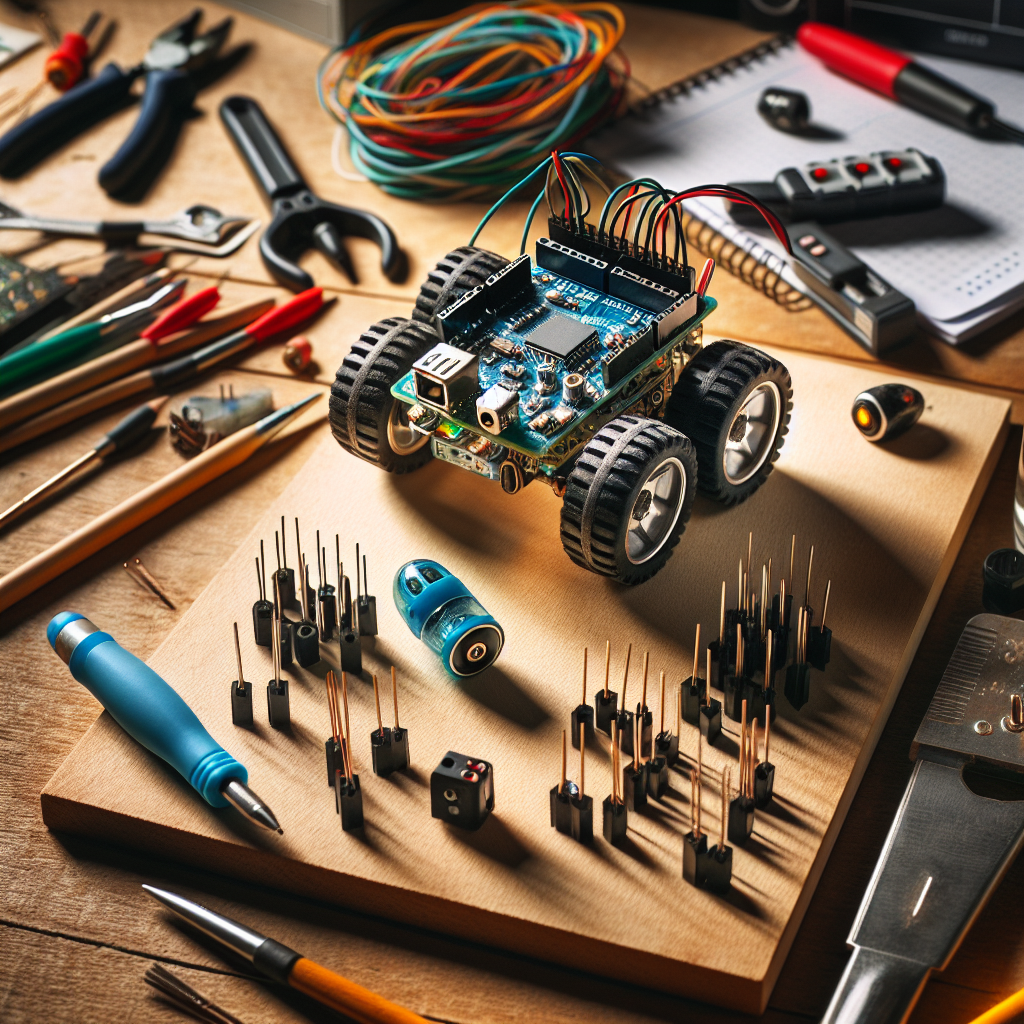
Building a robot isn't reserved for engineers with PhDs. Thousands of people with zero electronics experience build their first robot every week using affordable kits and free online tutorials. You don't need an engineering degree — just about $50 and a free afternoon. The maker robotics ecosystem in 2026 is more accessible than ever: Arduino kits under $70, step-by-step guides everywhere, and communities ready to help you debug your first wiring mistake. In this guide you'll learn what a robot actually is, what parts you need, how to choose your first platform, and a complete walkthrough of your first working robot build. This is the hub page for our build-your-own-robot content: whether you end up with an banner Arduino obstacle-avoider or a Raspberry Pi smart robot, the concepts here apply.
What Actually Makes Something a Robot?
The Sense-Think-Act Loop
Every robot follows the same basic pattern: sensors detect the environment (sense), a microcontroller processes that data (think), and motors or actuators respond (act). A remote-controlled car isn't a robot — it lacks the “think” step. An obstacle-avoiding car is a robot: it senses walls and decides to turn. That sense–think–act loop is the core of robotics fundamentals.
Anatomy of a Simple Robot
A simple robot has six essential components. The chassis or frame is the body — it holds everything together and can be plastic, metal, or 3D-printed. Motors provide movement: DC motors for wheels, servo motors for arms or steering. The microcontroller is the brain — it runs your code and reads sensors and drives motors (an Arduino UNO R3 or compatible board is typical). Sensors are the robot's eyes and ears: ultrasonic for distance, infrared for lines or obstacles, or a camera for vision. The power source is usually a battery pack or 9V battery; USB can power the board during development. Wiring and sometimes a motor driver (e.g. L298N) connect everything. On a typical robot car you'll see the microcontroller board, an HC-SR04 or similar distance sensor on the front, the motor driver, two DC motors with wheels, and a battery pack — all connected with jumper wires or a breadboard. No soldering is required for most beginner kits.
Choosing Your First Robot Platform
Arduino — Best for Most Beginners
Arduino is the best starting point for most people. The board itself costs about $15–$25; the community is huge, and programming is simple C/C++ in the Arduino IDE. It's ideal for motor control, sensor reading, and basic robotics — you'll learn electronics fundamentals and programming basics at the same time. You'll find thousands of tutorials, libraries, and compatible parts from SparkFun, Adafruit, and others. Limitations: no built-in WiFi unless you add a module like the ESP8266, no full operating system, and limited processing power. For a first robot, that simplicity is an advantage: you focus on one board, one IDE, and one language. Kits like the Elegoo Smart Robot Car bundle the Arduino UNO R3 (or clone), motors, HC-SR04 ultrasonic sensor, L298N motor driver, chassis, and step-by-step instructions for around $50–$70. We round up vetted beginner chassis in the closing section so this platform comparison stays focused on tradeoffs.

- BUILD, CODE & DRIVE YOUR OWN ROBOT CAR: Turn coding, electronics and engineering into a working programmable robot car you can assemble, program and drive; ideal for weekend family projects, STEM classrooms, coding clubs, robotics lessons and maker challenges
- EXPLORE FPV, LINE TRACKING & OBSTACLE AVOIDANCE: Control the robot with the ELEGOO app or IR remote, view live FPV video through the onboard camera, follow black lines, avoid obstacles with the ultrasonic sensor and explore multiple interactive driving modes
- BEGINNER-FRIENDLY BUILD WITH GUIDED WIRING: Keyed XH2.54 connectors help reduce wiring mistakes, while the illustrated tutorial and example programs guide beginners step by step from chassis assembly and module connection to programming and the first successful run
- GO BEYOND ASSEMBLY WITH CREATIVE CODING: Program with Arduino IDE to explore movement, sensors and control logic, then modify example code to create custom routes, reactions and robotics experiments that develop coding, problem-solving and engineering skills
- COMPLETE RECHARGEABLE STEM ROBOTICS KIT: Includes an ELEGOO UNO R3 controller board, ESP32-WROVER-based camera and Wi-Fi module, line-tracking and ultrasonic sensors, motors, IR remote and a 2000 mAh rechargeable lithium-ion battery; recommended for ages 8+ with adult guidance for first-time builders
Raspberry Pi — Best for AI and Vision Projects
Raspberry Pi is a full Linux computer ($35–$80). You program in Python, add a camera module, and can run AI/ML with TensorFlow Lite or OpenCV. It's better for computer vision, voice control, and internet-connected robots — when your project needs to “see” or “hear” in a sophisticated way. The trade-off: higher power use, more setup (SSH, Python libraries, camera drivers), and it's overkill for a first “blink and move” project. If your goal is a smart robot that sees and thinks, Pi is the natural next step after you've built something with Arduino. We have a full guide to Raspberry Pi robot projects when you're ready.

- Multiple Functions: Each of the six legs has three motors, the rotatable head has a camera and an ultrasonic distance sensor (Assembly required) (Raspberry Pi and Battery NOT included)
- Detailed Tutorial: Provides step-by-step assembly guide and complete Python code (The download link can be found on the product box) (No paper tutorial)
- Compatible Models: Raspberry Pi 5 / 4B / 3B+ / 3B / 3A+ (2B / 1B+ / 1A+ / Zero 2 W / Zero W / Zero 1.3 is also compatible but needs extra parts) (NOT included in this kit)
- Control Methods: Controlled wirelessly by your Android phone or tablet, iPhone (with Freenove App) and computer (run Windows, macOS or Raspberry Pi OS)
- Battery NOT Included: Please refer to the downloaded tutorial to buy
No-Code and Block-Based — Best for Kids and Quick Wins
Platforms like Scratch, Blockly, and the mBot app let you program without writing code. Great for ages 5–12 or adults who want quick results. Screen-free options (e.g. Botley, Cubetto) use physical buttons or blocks; block-based coding uses drag-and-drop blocks that represent sequences, loops, and conditionals. The ceiling is low for “real” robotics compared to Arduino or Pi, but they teach sequencing and logic and are ideal for a single afternoon win or building with young kids. If your goal is to get something moving today with zero software setup, a no-code or block-based kit is valid — you can always graduate to Arduino or Raspberry Pi later.

- Entry-level Coding Robot Toy: mBot robot kit is an excellent educational robot toys, designed for learning electronics, robotics and computer programming in a simple and fun way. From Scratch to Arduino, this STEM projects for kids ages 8-12 helps kids to learn programming step by step via interactive software and learning resources
- Easy to Build: With clearly building instructions, this building kit can be easily built within 15 minutes. Kids will learn more about electronics, machinery, and robotics components through building mBot. You can also play this STEM projects for kids ages 8-12 as a remote control car with its multi-functions: line-follow, obstacle-avoidance and so on
- Rich Tutorials for Programming: With Offerring coding cards and lessons, children can easily use all fonctions of mBot and creat projects by themselves. Matched with 3 free Makeblock apps and mBlock software, kids can enjoy remote control, play programming games, and coding with mBot robot kit. Note that the remote controller needs a CR2025 battery(NOT INCLUDED), and the robot kit needs 4 AA batteries (NOT INCLUDED)
- Awesome Gift for Kids: Surprise your little Kids with super cool robotics kit and let them discover the secrets of programming and electronics. Being well packaged and metal material, this robot kit is a perfect learning and educational toy gift for boys and girls on Birthday, Children's Day, Christmas, Easter, Summer Camp Activities, Back To School, Home Fun Time
- Creative Robot with Add-on Packs: So many fun configuration with an open-source system, this programmable robot is compatible with rich add-on packs. mBot can be connected to 100+ electronic modules and 500+ parts from the Makeblock platform, compatible with LEGO parts
Decision Tree: Which Platform Should You Pick?
Use this as a simple guide: Learn electronics and coding? → Arduino. AI, vision, or a smart robot? → Raspberry Pi. Fun with kids, fast? → No-code kit. Not sure? → Start with Arduino; it's the best default for a first robot build.
Essential Tools and Workspace Setup
Tools You Need (and Don't Need)
Must-haves: a small Phillips and flat-head screwdriver set, wire strippers or a pair of scissors (for trimming jumper wires in kits), and a computer with a USB port for uploading code. Nice to have once you go beyond kits: a multimeter (to check voltage and continuity), a soldering iron, a third-hand tool, and heat shrink tubing. You don't need an oscilloscope, 3D printer, or CNC for your first build. Most beginner robot kits are soldering-free and use plug-in connections — breadboards and jumper wires. A clean, well-lit workspace with a bit of room to lay out parts is enough. Estimated cost for tools if you have nothing: under $25 for the basics.
Setting Up Your Software
Install the Arduino IDE from the official Arduino website, connect your board with a USB cable, select the correct board (e.g. Arduino Uno) and port (COM port on Windows, /dev/ttyUSB or similar on Mac/Linux), and upload the “Blink” example to verify the connection. If the onboard LED blinks, you're ready. First-time setup takes about 10 minutes. For Raspberry Pi you'd use Thonny or a similar editor; for a first robot we're assuming Arduino. Driver issues are rare with modern Arduino clones; if the port doesn't appear, try another USB cable (some are charge-only) or install the CH340 driver if your board uses that chip.
Your First Build — Obstacle-Avoiding Robot Car
What You'll Build
A two-wheel robot car that drives forward, detects obstacles with an ultrasonic sensor, and turns to avoid them is the classic first project. Total cost is typically $50–$70 with a kit like the Elegoo Smart Robot Car. You'll have a working autonomous robot in one afternoon. Build time is usually 2–3 hours for assembly and code upload.
Components and Wiring
You'll need: an Arduino UNO R3 (or Elegoo/equivalent clone), an HC-SR04 ultrasonic sensor (trigger and echo pins), an L298N motor driver, two DC motors with wheels, a chassis, jumper wires, and a 9V battery or 4×AA battery pack. Optional: breadboard for tidier wiring. Connect the HC-SR04 trigger to a digital pin (e.g. 10), echo to another (e.g. 11). The L298N gets 5V and GND from the Arduino (or separate supply for motors), and the two motor outputs go to the left and right motors. Motor enable pins connect to PWM-capable pins (e.g. 5 and 6) for speed control. Double-check your kit's wiring diagram — trigger/echo swapped is a very common mistake. Wrong motor polarity will make the robot spin instead of drive straight; if one wheel runs backward, swap that motor's two wires. Loose power connections cause intermittent behavior.
The Code — Line by Line
The sketch has a few main parts. In setup() you set pin modes (sensor pins as output/input, motor pins as output) and start serial communication for debugging. In loop() you read the distance from the ultrasonic sensor, then call move or turn functions based on that value. A readDistance() function triggers the HC-SR04 (send a short pulse on trigger, measure the pulse length on echo, convert to centimeters using the speed of sound). Helper functions like moveForward(), turnRight(), turnLeft(), and stop() set the motor pins high/low or PWM values. If distance is below a threshold (e.g. 15 cm), the robot turns; otherwise it goes forward. Paste the complete sketch from your kit's tutorial or from a SparkFun or Adafruit guide into the Arduino IDE, select the correct board and port, and upload. No soldering is required for kit builds.
Testing and Debugging
When it doesn't work on the first try (it usually won't), debug in this order: (1) Use the serial monitor to print distance readings — if they're always 0 or 999, check sensor wiring and pin numbers. (2) Check motor wiring and polarity — if one wheel spins backward, swap its two wires at the L298N. (3) Ensure the battery is charged and the motor driver has power (LED on the driver board). (4) Add a short delay (e.g. 50 ms) after each sensor read to avoid noise. (5) Confirm the threshold distance matches your environment — 15 cm works on a table; you may need 20–30 cm for carpet. Most problems are wiring or power, not the code. The five most common issues: loose jumper, trigger and echo reversed, motor pins wrong, dead battery, and threshold too small or too large.
Arduino Robot Car Tutorial — Build from Scratch (Paul McWhorter). Embed after “Your First Build” section.
What to Build Next — Your Progression Path
Level 2: Add Bluetooth control. Add an HC-05 (or similar) Bluetooth module and control the robot from your phone. You'll learn serial communication and simple app integration. Many kits include the module; otherwise it's a few dollars and four wires.
Level 3: Line-following robot. Add IR sensors (e.g. TCRT5000 array) and follow a black line on a white surface. You'll touch analog sensor reading and basic PID-style control. Great next step after obstacle avoidance.
Level 4: Robot arm. Build a small servo-based arm (e.g. 3–4 SG90 or MG996R servos). You'll learn multi-axis control and get a taste of inverse kinematics. Kits and 3D-printed designs are widely available.
Level 5: Raspberry Pi smart robot. Move to a Pi for camera vision, voice control, or AI. You'll use Linux, Python, and computer vision. Our Raspberry Pi robot projects guide walks through several builds.
For detailed project ideas and code, see our Arduino robot projects guide (five progressive builds from obstacle avoider to maze solver and robot arm). To understand the sensors you're using in depth, read robot sensors explained. New to robotics entirely? Our robotics for beginners roadmap lays out what to learn and in what order.
Resources and Communities
YouTube: Paul McWhorter (Arduino from zero), DroneBot Workshop (electronics), James Bruton (advanced builds), ExplainingComputers (Raspberry Pi).
Communities: r/robotics and r/arduino on Reddit, the Arduino Forum, Instructables robot projects, SparkFun forums, and local Maker Faires or hackerspaces.
Recommended first kits: Elegoo Smart Robot Car V4 (around $65), Arduino Starter Kit (electronics only, around $40), or SunFounder PiCar (around $80 if you choose the Pi path). For ordered milestones after your first build, use our robotics for beginners roadmap and Arduino robot projects hub—both keep the focus on skills, not SKUs.
FAQ
How much does it cost to build your first robot?
About $50–$80 with a kit; $20–$40 if you buy components separately and already have a computer. Kits include the board, motors, sensors, and often a chassis and battery pack. You'll need a computer with USB for uploading code, but no other special equipment. The cheapest path is an Arduino clone plus a minimal set of parts; the most convenient is an all-in-one kit like the Elegoo Smart Robot Car.
Do I need to know how to code to build a robot?
No. Kit tutorials walk you through every line of code, and you learn as you build. Doing a short Arduino “basics” tutorial first will speed things up.
Do I need to know how to solder?
Not for most beginner kits. They use plug-in connections. Soldering becomes useful when you move to custom circuits or intermediate projects.
What's the difference between Arduino and Raspberry Pi for a first robot?
Arduino: simpler, cheaper, better for learning electronics and real-time control. Raspberry Pi: more powerful, better for camera and AI, but steeper learning curve. For a first robot, Arduino is usually the better choice.
Can I build a robot with my kids?
Yes. Ages 8+ can help with assembly and simple code; ages 12+ can do most of it with a bit of guidance.
How long does it take to build a first robot?
With a kit: about 2–3 hours for assembly and uploading code. From scratch: 4–8 hours depending on experience.
What if my robot doesn't work on the first try?
It won't — and that's the point. Debugging is where a lot of the learning happens. Check wiring first (loose jumper, wrong pin, trigger/echo swapped), then code (correct pin numbers, sensible threshold), then power (battery charged, motor driver LED on). Use the serial monitor to print distance readings and motor states. Most issues are solved in under 30 minutes with a methodical check.
Is building robots a useful career skill?
Yes. Robotics engineers, embedded developers, and automation specialists are in demand. The skills from hobby builds transfer directly.
Can I build a robot with no electronics background?
Yes. Every expert started as a beginner. Kits are designed to teach you as you build.
What's the best robot to build after my first one?
Add Bluetooth control to your first robot, then try a line follower, then a small robot arm. Follow the progression path above and our robot programming languages guide when you're ready to choose a next language.
Conclusion
You need about $50, a computer, and a few free hours to build your first working robot. Arduino kits are the best starting point for most people. The hardest part is starting — once your first robot moves, you'll understand why makers can't stop building. Choose your next step: browse our best robot building kits guide for recommendations, dive into Arduino robot projects for your next build, or read robotics for beginners for a full learning roadmap. If you are shopping for desk companions or gift-tier bots, our best robot toys for adults roundup sits alongside those build guides. Every expert started as a beginner; your first robot is just the beginning.
BringOnTheRobots.com is a participant in the Amazon Services LLC Associates Program, an affiliate advertising program designed to provide a means for sites to earn advertising fees by advertising and linking to Amazon.com, Amazon.co.uk, Amazon.ca, and other Amazon stores worldwide. Prices for items above were last updated on 2026-10-21 at 21:45. See Amazon's 30 Day Return Policy.